
Exa
Connect to Exa for AI-powered semantic web search, content enrichment, finding similar pages, website crawling, direct answers, structured research, and large-scale URL discovery.
Connect to Exa for AI-powered semantic web search, content enrichment, finding similar pages, website crawling, direct answers, structured research, and large-scale URL discovery.

Supports authentication: API Key
Set up the agent connector
Section titled “Set up the agent connector”Register your Exa API key with Scalekit so it can authenticate and proxy requests on behalf of your users. Unlike OAuth connectors, Exa uses API key authentication — there is no redirect URI or OAuth flow.
-
Generate an Exa API key
-
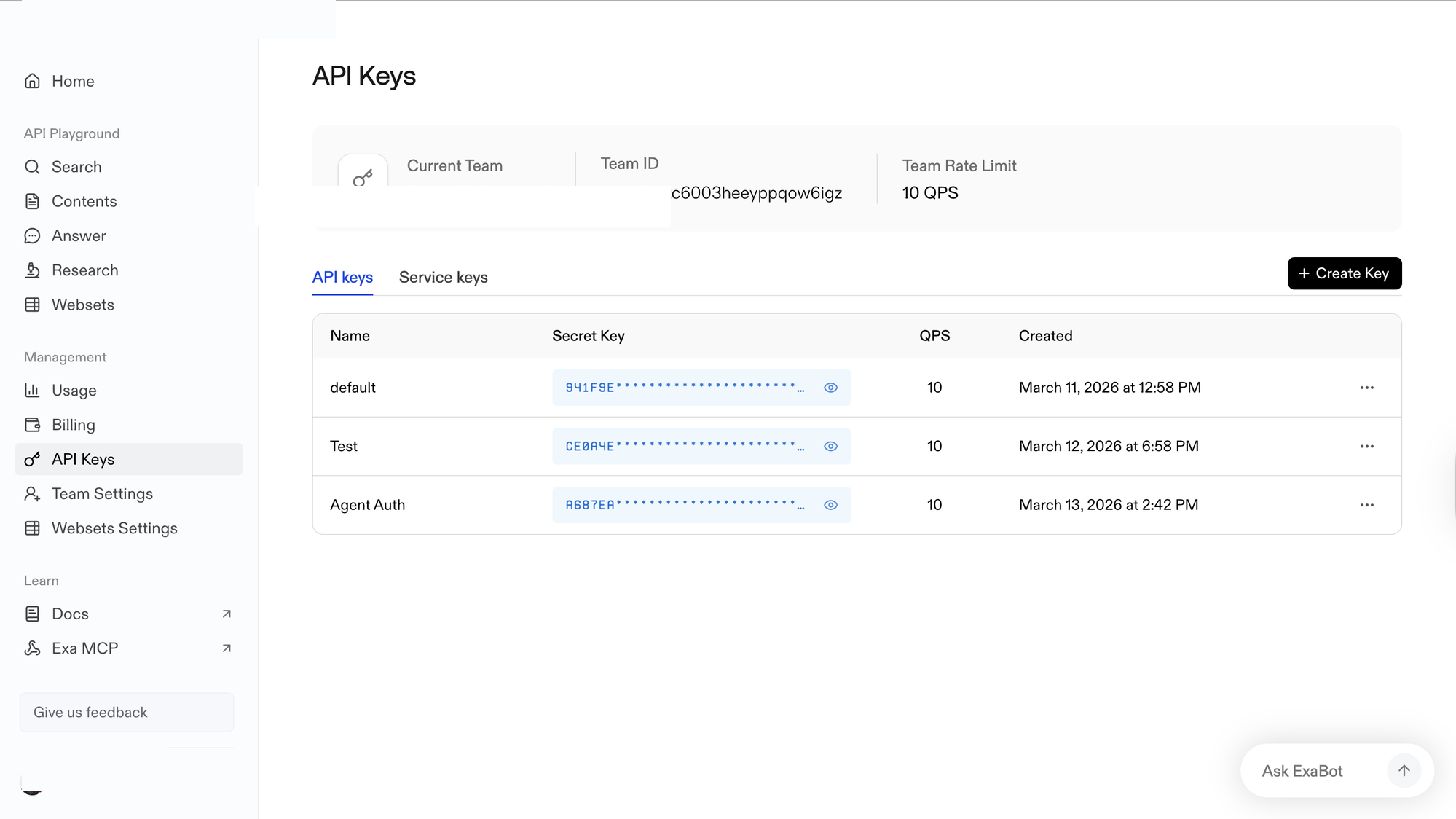
Sign in to dashboard.exa.ai/api-keys. Under Management, click API Keys.
-
Click + Create Key, enter a name (e.g.,
Agent Auth), and confirm. -
In the Secret Key column, click the eye icon to reveal the key and copy it. Store it somewhere safe — you will not be able to view it again.
-
-
Create a connection in Scalekit
-
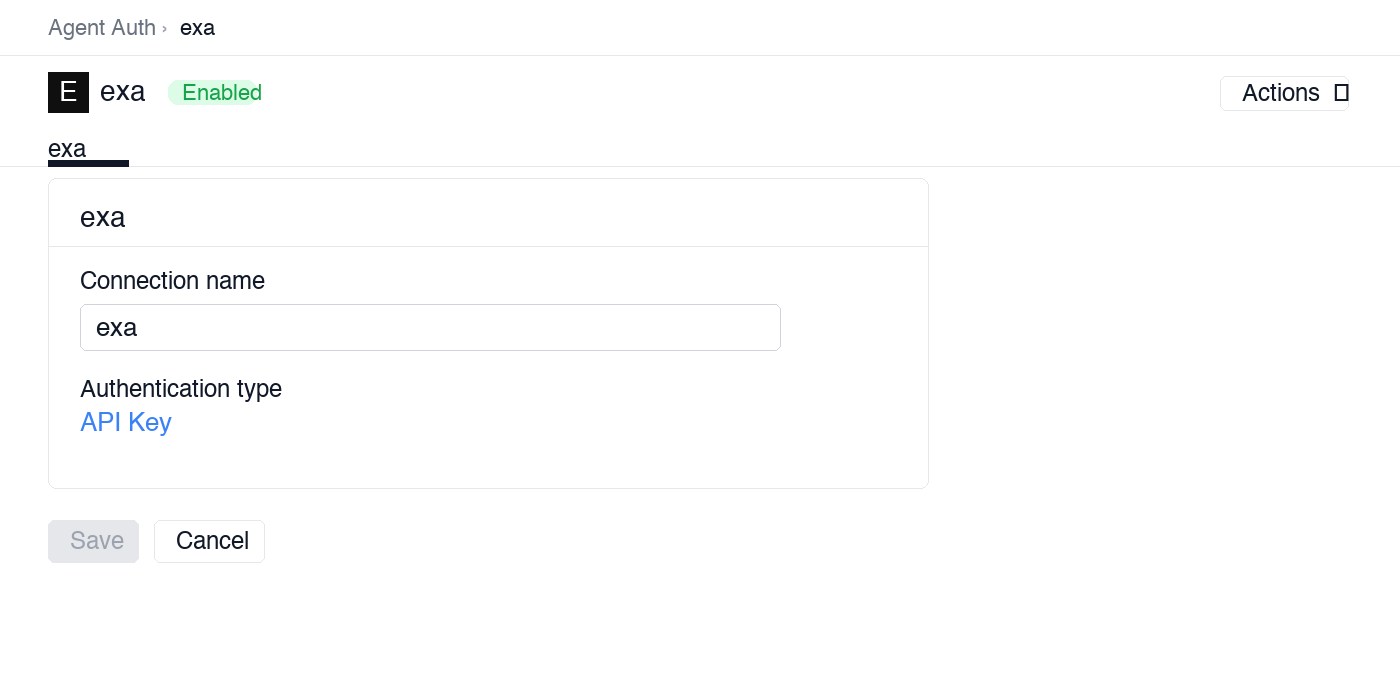
In Scalekit dashboard, go to Agent Auth → Create Connection. Find Exa and click Create.
-
Note the Connection name — you will use this as
connection_namein your code (e.g.,exa).
-
-
Add a connected account
Connected accounts link a specific user identifier in your system to an Exa API key. You can add them via the dashboard for testing, or via the Scalekit API in production.
Via dashboard (for testing)
-
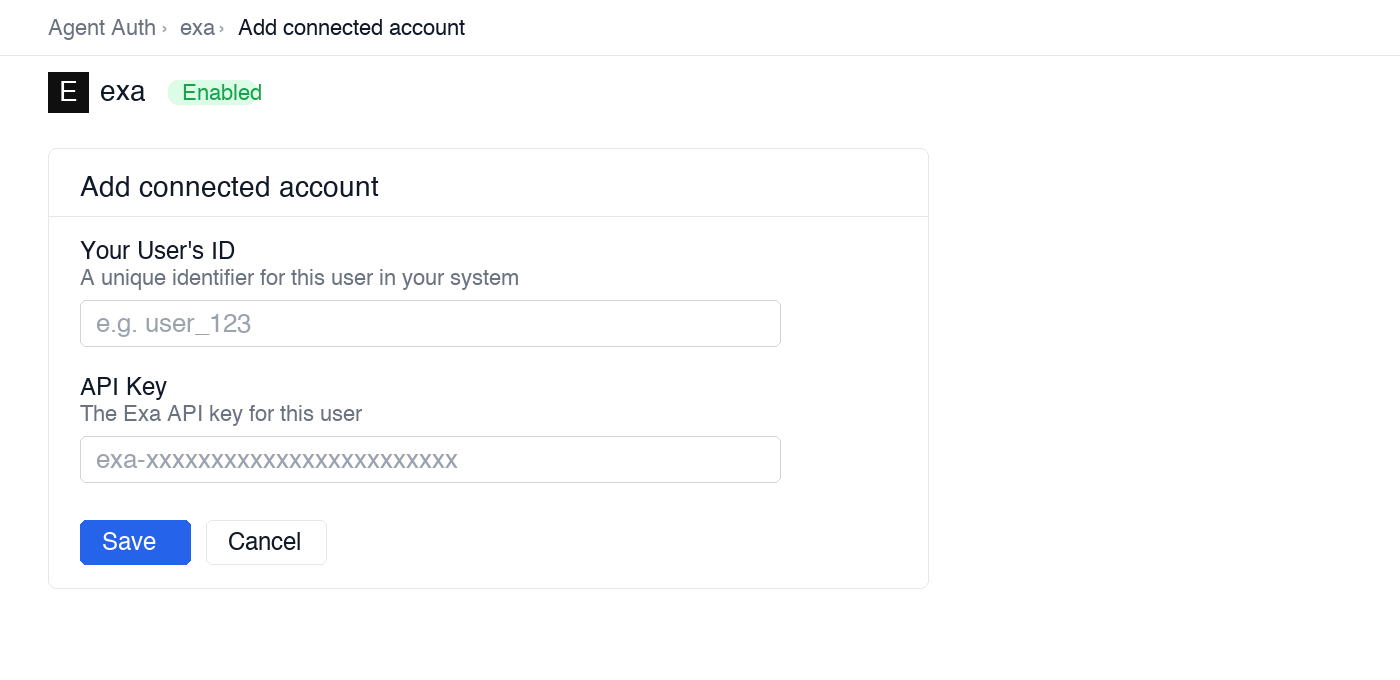
Open the connection you created and click the Connected Accounts tab → Add account.
-
Fill in:
- Your User’s ID — a unique identifier for this user in your system (e.g.,
user_123) - API Key — the Exa API key you copied in step 1
- Your User’s ID — a unique identifier for this user in your system (e.g.,
-
Click Save.
Via API (for production)
scalekit_client.actions.upsert_connected_account(connection_name="exa",identifier="user_123", # your user's unique IDcredentials={"api_key": "your-exa-api-key"}) -
Once a connected account is set up, make API calls through the Scalekit proxy. Scalekit injects the Exa API key automatically — you never handle credentials in your application code.
import scalekit.client, osfrom dotenv import load_dotenvload_dotenv()
connection_name = "exa" # connection name from your Scalekit dashboardidentifier = "user_123" # your user's unique identifier
# Get your credentials from app.scalekit.com → Developers → Settings → API Credentialsscalekit_client = scalekit.client.ScalekitClient( client_id=os.getenv("SCALEKIT_CLIENT_ID"), client_secret=os.getenv("SCALEKIT_CLIENT_SECRET"), env_url=os.getenv("SCALEKIT_ENV_URL"),)actions = scalekit_client.actions
# Make a request via Scalekit proxy — no API key needed hereresult = actions.request( connection_name=connection_name, identifier=identifier, path="/search", method="POST", json={"query": "LLM observability tools 2025", "num_results": 5})print(result)Tool list
Section titled “Tool list”exa_search
Section titled “exa_search”Search the web with a semantic or keyword query. Returns ranked results with titles, URLs, published dates, and optional full-page content. Semantic search (type: neural) finds conceptually similar pages even when your exact words don’t appear in the source. Keyword search (type: keyword) uses traditional exact-match scoring.
Credits: 1 credit per request + 1 credit per result when contents.text or contents.summary is requested.
| Name | Type | Required | Description |
|---|---|---|---|
query | string | Yes | Search query — phrase it as a statement or question for best semantic results |
num_results | integer | No | Number of results to return (default 10, max 100) |
type | string | No | Search mode: neural for semantic similarity (default), keyword for exact-match |
category | string | No | Filter by content type: company, research paper, news, github, tweet, personal site, pdf, linkedin profile |
include_domains | array | No | Restrict results to these domains (e.g., ["techcrunch.com", "arxiv.org"]) |
exclude_domains | array | No | Exclude results from these domains |
start_published_date | string | No | ISO 8601 date — only return pages published after this date (e.g., 2025-01-01) |
end_published_date | string | No | ISO 8601 date — only return pages published before this date |
start_crawl_date | string | No | ISO 8601 date — only return pages crawled by Exa after this date |
end_crawl_date | string | No | ISO 8601 date — only return pages crawled by Exa before this date |
include_text | array | No | Strings that must appear in the page text |
exclude_text | array | No | Strings that must not appear in the page text |
location | string | No | ISO country code for location-biased results (e.g., US, GB, DE) |
contents.text | boolean | No | Include full page text in each result (costs 1 extra credit per result) |
contents.highlights | object | No | Include highlighted snippets — set num_sentences and highlights_per_url |
contents.summary | object | No | Include an AI-generated page summary — optionally set query to focus the summary |
exa_find_similar
Section titled “exa_find_similar”Find web pages that are semantically similar to a given URL. Exa uses its neural index to surface pages with matching content, tone, and topic — useful for competitive research, discovering similar products, or finding alternative sources on a topic.
Credits: 1 credit per request + 1 credit per result when contents.text or contents.summary is requested.
| Name | Type | Required | Description |
|---|---|---|---|
url | string | Yes | URL to find similar pages for (e.g., https://example.com/product) |
num_results | integer | No | Number of results to return (default 10, max 100) |
include_domains | array | No | Restrict results to these domains (e.g., ["techcrunch.com", "wired.com"]) |
exclude_domains | array | No | Exclude results from these domains |
start_published_date | string | No | ISO 8601 date — only return pages published after this date |
end_published_date | string | No | ISO 8601 date — only return pages published before this date |
start_crawl_date | string | No | ISO 8601 date — only return pages crawled by Exa after this date |
end_crawl_date | string | No | ISO 8601 date — only return pages crawled by Exa before this date |
contents.text | boolean | No | Include full page text in each result (costs 1 extra credit per result) |
contents.highlights | object | No | Include highlighted snippets — set num_sentences and highlights_per_url |
contents.summary | object | No | Include an AI-generated page summary — optionally set query to focus the summary |
exa_crawl
Section titled “exa_crawl”Crawl all pages of a website starting from a given URL and extract their text content. Follows internal links up to the configured depth. Use this to index documentation sites, company knowledge bases, or competitor content for downstream processing.
Credits: Credits vary based on the number of pages crawled and content extracted.
| Name | Type | Required | Description |
|---|---|---|---|
url | string | Yes | Starting URL to crawl (e.g., https://docs.example.com) |
max_depth | integer | No | Maximum number of link hops to follow from the starting URL (default 1) |
max_pages | integer | No | Maximum number of pages to retrieve (default 100) — set this to control credit usage |
include_subdomains | boolean | No | Whether to follow links to subdomains of the starting URL (default false) |
exclude_paths | array | No | URL path patterns to skip (e.g., ["/archive/*", "/blog/*"]) |
exa_get_contents
Section titled “exa_get_contents”Retrieve enriched content — full text, highlighted snippets, or AI-generated summaries — for one or more specific URLs without running a search. Use this when you already have URLs (from a prior search, a CRM, or an external list) and want to extract structured content from them.
Credits: 1 credit per URL + 1 credit per content item retrieved (text, highlights, or summary each count separately).
| Name | Type | Required | Description |
|---|---|---|---|
urls | array | Yes* | List of URLs to retrieve content for (e.g., ["https://example.com/about"]) |
ids | array | Yes* | List of Exa result IDs from a prior exa_search or exa_find_similar call — use instead of urls when you have Exa IDs |
text | boolean | No | Include full page text for each URL (costs 1 extra credit per page) |
text.max_characters | integer | No | Truncate page text to this many characters |
text.include_html_tags | boolean | No | Preserve HTML tags in the returned text — helps LLMs interpret page structure |
highlights | object | No | Extract relevant text snippets from each page |
highlights.query | string | No | Custom query to guide which snippets are highlighted |
summary | object | No | Generate an AI summary for each page (costs 1 extra credit per page) |
summary.query | string | No | Focus the summary on a specific question or topic |
summary.schema | object | No | JSON schema for structured summary output |
subpages | integer | No | Number of subpages to also crawl from each URL (default 0) |
subpage_target | string | No | Keyword or path pattern to target specific subpages (e.g., "pricing") |
max_age_hours | integer | No | Maximum age of cached content in hours — set a lower value to force a fresher crawl |
*Provide either urls or ids — at least one is required.
exa_answer
Section titled “exa_answer”Get a concise natural language answer to a question, synthesized from live web search results. Returns the answer text and a list of source URLs used to generate it. Use this when you need a direct factual response rather than a list of links.
Credits: Credits vary based on the number of sources retrieved.
| Name | Type | Required | Description |
|---|---|---|---|
query | string | Yes | The question to answer (e.g., "What are the rate limits for GPT-4o?") |
num_results | integer | No | Number of web sources used to generate the answer (default 5) |
text | boolean | No | Include the source text snippets alongside the answer |
include_domains | array | No | Restrict source lookup to these domains |
exclude_domains | array | No | Exclude these domains from the source lookup |
start_published_date | string | No | ISO 8601 date — only use sources published after this date |
end_published_date | string | No | ISO 8601 date — only use sources published before this date |
exa_research
Section titled “exa_research”Run in-depth, multi-angle research on a topic. Exa decomposes the topic into multiple sub-queries, runs each in parallel, and synthesizes a structured output. Optionally provide a JSON schema to control the output shape. Use this for competitive intelligence, market research, or any question that requires aggregating information across many sources.
Credits: Significantly more expensive than exa_search — cost scales with num_subqueries. Each sub-query consumes search and content retrieval credits.
| Name | Type | Required | Description |
|---|---|---|---|
topic | string | Yes | Research topic or question (e.g., "Competitive landscape of AI coding assistants in 2025") |
num_subqueries | integer | No | Number of parallel sub-queries to run (default 5, max 15) — higher values improve coverage but increase cost |
output_schema | object | No | JSON schema defining the structure of the output — omit for free-form markdown output |
include_domains | array | No | Restrict all sub-query sources to these domains |
exa_websets
Section titled “exa_websets”Execute a complex natural language query designed to return a large set of matching URLs — potentially thousands. Each result is vetted against your criteria before being returned. Use this for bulk data collection tasks such as building lead lists, aggregating industry news, or sourcing research datasets.
Credits: Credits are consumed per vetted result. Cost scales with count.
| Name | Type | Required | Description |
|---|---|---|---|
query | string | Yes | Natural language description of the set to find (e.g., "YC-backed AI startups founded after 2022") |
count | integer | No | Target number of matching URLs to return (default 10, can be thousands) |
entity_type | string | No | Type of entity to find: company, person, article, research paper, job listing, event, product |
criteria | array | No | Additional filter criteria — each item has a description and options.type (must, should, or must_not) |
include_domains | array | No | Restrict results to these domains (e.g., ["linkedin.com", "crunchbase.com"]) |